What's Inside (Quick Jump)
Most divers glance at their wrist, see a bunch of numbers, and pretend they know what’s going on. I did the same for my first 30 dives. The truth? Learning how to read a dive computer properly can literally keep you out of a decompression chamber. And it’s not just about the NDL number—there’s a rhythm to it. Once you understand the layout, it becomes second nature, like checking your car’s speedometer.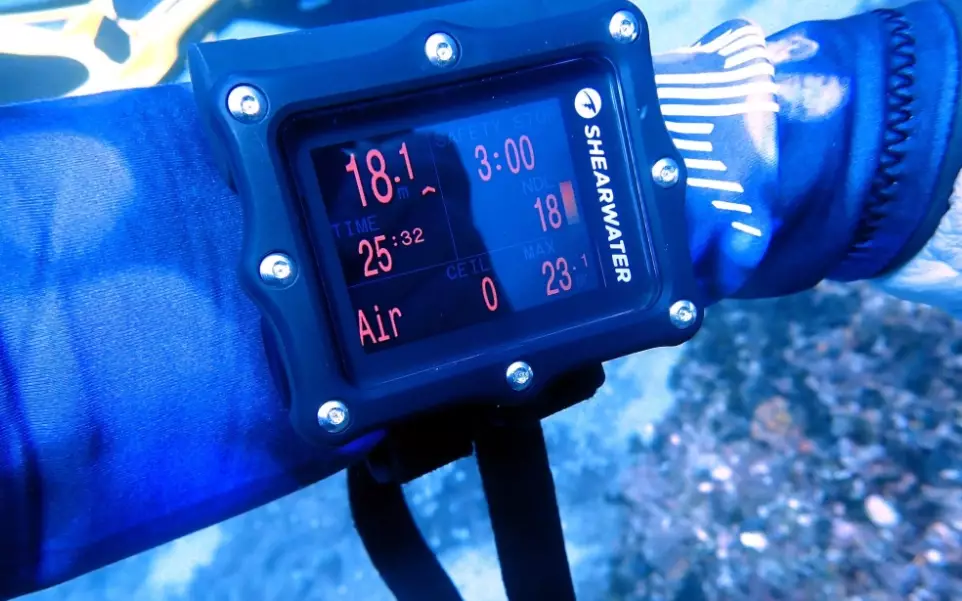
The Screen Layout: What Each Number Means
Dive computers look different across brands (Suunto, Shearwater, Garmin, etc.), but they all show the same core info. I’ll use a typical Suunto Zoop as an example because it’s what most new divers rent. The main screen usually has three zones: top, middle, bottom.
- Top row (small digits): Depth and dive time. Depth is usually in meters or feet—check your settings before you splash. Dive time counts from when you submerge, not from when you press start.
- Middle row (big digits): This is your NDL (No-Decompression Limit) or, if you’re in deco, the deco stop time. It’s the most important number when you’re at depth.
- Bottom row (icons and bars): Ascent rate bar, safety stop timer, gas pressure (if connected via transmitter), battery level, and sometimes temperature.
Here’s a mistake I see often: divers confuse the “Dive Time” with “NDL.” On the Zoop, the NDL is in the center with a big font, but some beginners look at the smaller “Dive Time” and think that’s their remaining bottom time. Nope. Dive time just tells you how long you’ve been down, not when you need to go up. Check your manual for the exact layout—every computer is slightly different.
NDL and How to Read It Without Panic
NDL stands for No-Decompression Limit. It’s the time you can stay at your current depth and still ascend directly to the surface without a mandatory decompression stop. On most computers, the NDL shows in minutes and counts down as you stay at depth. When it gets low, say under 5 minutes, the number starts blinking or turns red.
But here’s the non-consensus bit: the NDL is not a target. It’s a limit. I see divers trying to “max out” their NDL like it’s a high score. That’s a bad idea. The NDL is based on a theoretical model (like Bühlmann ZHL-16C), and it assumes you’re at exactly that depth for the whole time. If you’re yo-yoing up and down—say, looking at a turtle at 30 meters then ascending to 15 meters—the computer recalculates and the NDL might actually go up. But that doesn’t mean you’re safe. Your tissue loading is more complex. My advice: treat your NDL as a soft ceiling and always keep a buffer of at least 5 minutes.
What about when the NDL disappears and a “ceiling” appears? That means you’ve crossed into decompression diving. The computer will show a stop depth (e.g., 3m) and a stop time. Don’t freak out. Just follow the numbers: ascend slowly, stop at the indicated depth, and wait until the timer hits zero. I’ve had to do this once, and it was actually less stressful than I thought—the computer guides you.
Ascent Rate: The Bar That Saves Your Lungs
Most computers show a vertical bar on the left or right side that fills up as you ascend too fast. The safe ascent rate is 9-10 meters per minute (30 feet per minute). On my Shearwater Perdix, the bar turns yellow when you’re at 8 m/min and red when you exceed 10. If you see that bar filling, slow down. I know it sounds obvious, but in the excitement of ending a dive, people bolt for the surface. I did it once after a shark encounter—my computer screamed at me (well, the bar flashed red), and I had to hold onto a rock for a minute to calm down. The bar doesn’t lie. Use it.
Safety Stop Timer and Ceiling Warnings
A safety stop is typically 3 minutes at 5 meters (15 feet). Your computer will automatically start a countdown when you reach that depth, shown as a small timer. Some computers show a little STOP icon with a countdown. Don’t ignore it—even if you feel fine, it’s cheap insurance. I’ve seen divers skip the safety stop because they were cold, and later complain about fatigue. That’s usually microbubbles talking.
Ceiling warnings appear in red when you’re in deco. The computer might show a “ceiling” value like “3m” which means you cannot ascend above 3 meters until the stop time clears. If you violate the ceiling, the computer will likely lock out for 24 hours—meaning it won’t function as a dive computer anymore. That’s a scary situation. I’ve never had it happen, but I’ve talked to a guy who did: he had to do a 15-minute stop at 6 meters because he ascended too fast. Learn from his mistake.
Gas Pressure, Battery, and Other Icons
If your computer is air-integrated (with a transmitter on your first stage), you’ll see tank pressure in bar or psi. Most computers show it in the bottom corner. Watch for the low-air warning—usually at 50 bar. It’ll flash and sometimes beep. I also keep an eye on the battery icon: a half-full battery might last a weekend, but don’t risk it. Change it before a big trip. You’d be surprised how many divers miss a dive because their computer died on the boat. I always carry a spare battery in my save-a-dive kit.
| What You See | What It Means | What to Do |
|---|---|---|
| NDL blinking red | Less than 5 minutes of no-deco time left | Begin ascent now, safety stop mandatory |
| Ascent bar > 10 m/min | Ascending too fast | Slow down, hold onto anchor line |
| Ceiling number (e.g., 3m) | You are in decompression | Stay at or below that depth until timer clears |
| Tank pressure | Low gas | Ascend immediately, skip safety stop if necessary |
| Battery icon flashing | Low battery | Replace before next dive, carry spare |
Real Questions From Divers Like You
That’s because your computer recalculates tissue loading based on your new depth. Ascending reduces pressure, so your NDL increases. But don’t take that as a free pass to stay longer—your tissues are still off-gassing, and the computer is using a model, not a crystal ball. I treat the new NDL as a suggestion, not a guarantee. Keep a buffer.
Dive time is total time underwater since you submerged. NDL is the time you have left before you hit the no-deco limit at your current depth. New divers often mix them up because both are in minutes. On most Suuntos, the big central number is NDL, and dive time is smaller in the corner. Read your manual—seriously, it takes 10 minutes and saves confusion.
Your computer is technically correct—it’s not mandatory. But safety stops are recommended by every training agency (PADI, SSI, etc.) for any dive deeper than 10 meters. I do them religiously. They reduce subclinical bubble formation. You might feel fine, but your body will thank you later. Plus, it’s a good habit for when you do need a deco stop.
Reading a dive computer is like reading a map—once you know the symbols, you stop getting lost. Practice on the surface: turn it on, simulate a dive, and watch how the numbers change. That’s what I do with my students before every open water dive. And remember, the computer is a tool, not a replacement for your brain. If something looks weird, trust your gut and ascend slowly. Stay safe out there. This article was fact-checked against manufacturer manuals and training agency standards.



Leave a Comment