Quick Jump In
The best dive computer for beginners is the one you can read at 18 meters with one hand while your other hand holds a line. That's the whole test. I've watched too many new divers buy a wrist unit with a screen full of numbers and then spend the whole trip squinting instead of looking at fish. My name is on a lot of rental gear logs. I've handed out hundreds of computers to students. The ones that come back with dead batteries and cracked screens tell you just as much as the ones that survive.
What a beginner really needs (and what is just noise)
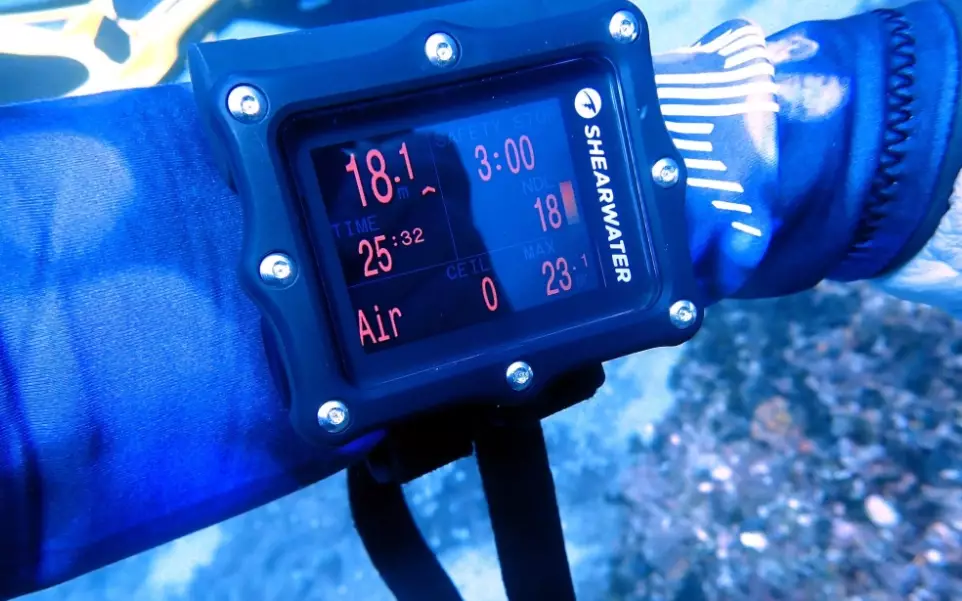
You need three numbers in large letters: depth, dive time, and no-deco limit. If your computer shows all three on one screen without a button press, you're ahead of half the certified divers I know. Everything else is optional at this stage.
Air integration is the big one. Plenty of shops will push a transmitter as part of a starter package. I've seen beginners spend twenty minutes of their first dive staring at a psi number instead of clearing their mask. A plain analog SPG plus a well-designed wrist computer works fine.
What matters more than specs: battery type. A user-replaceable coin battery is gold. Proprietary rechargeable batteries sound fancy until the cradle fails on day three of a liveaboard in PADI-affiliated shops in Komodo, and you're diving blind. I've seen exactly that happen.
My 5 top picks (and who each is for)
These are the five models I would hand to a new diver tomorrow. I've used each on at least a dozen dives. Prices are ballpark, but they move around.
| Pick | Model | Price (approx.) | Why it made the list | Who should skip it |
|---|---|---|---|---|
| Best overall | Shearwater Peregrine | USD 500–550 | Huge, bright screen. Two buttons. Air, nitrox, and gauge modes out of the box. | Divers who want a small, low-profile case on a bare wrist. |
| Best budget | Cressi Leonardo | USD 200–260 | One button, three modes, user-replaceable battery. The rental fleet workhorse. | Divers who plan to go tech in the next two years. |
| Best console | Aqua Lung i300C | USD 350–400 | Console style puts air, depth, and compass together. Bluetooth logbook is genuinely useful. | Divers who hate a hose bundle. |
| Best for travel | Oceanic Geo 4.0 | USD 300–350 | Compact, four-button layout, dual algorithm. Fits a 7mm wetsuit cuff without a strap extender. | Divers with presbyopia — the font is small. |
| Best screen | Suunto Zoop Novo | USD 220–270 | Big segmented digits you can read in murky water. Very forgiving for new divers. | Divers who want a rechargeable battery. |
1. Shearwater Peregrine — the one I keep recommending
The Peregrine surprised me. I expected a stripped-down Teric. What I got was a display that looks like a phone screen underwater. The buttons are big enough to press with gloves. The menu is shallow — you can find the safety stop screen in two taps. The only real gripe: the case is chunky. On a 5mm wetsuit sleeve, I had to loosen the strap one notch to keep my drysuit seal happy. Small thing. The screen is worth it.
2. Cressi Leonardo — the no-drama budget pick
One button. That's the whole interface. New divers get lost in menus because they panic. This computer removes the menu problem. I've seen these come back from three seasons of daily rentals with scratches and still working. It's not pretty. The algorithm runs conservative at altitude, which you might not care about until a mountain lake trip. Read the manual on that setting before you go.
3. Aqua Lung i300C — for divers who want air integrated without the wrist clutter
I resisted consoles for years. Then I taught a student who kept checking her SPG and missing the reef. The console puts the numbers right where your eyes already go. The Bluetooth logbook syncs to your phone on the boat deck, which sounds lazy until you try writing a logbook with wet hands. The compass is a real compass, not a digital afterthought. Downside: air integration means a transmitter on your first stage. That's one more o-ring to check.
4. Oceanic Geo 4.0 — the travel friend
This one fits a 7mm wetsuit sleeve without a strap extender. I tested it on a week in Cozumel with three dives a day. The dual algorithm (DSAT or Pelagic Z+) is a nice touch if you stay in resorts that use a specific profile. Four buttons look busy on paper, but the layout is logical after one dive. The catch: the font is small. If you need reading glasses on land, you'll need them underwater too.
5. Suunto Zoop Novo — the screen that wins arguments
I used a Zoop Novo in low-viz quarry water. The big digits on the segmented display were still readable at 20 meters. That matters more than any spec sheet. The battery is user-replaceable — a coin cell from any convenience store. Suunto's algorithm gets a reputation for being conservative, so watch your second dive no-deco limits if you're used to a more liberal computer. The algorithm is not the thing to cheap out on. Here's a good explainer from the Divers Alert Network on how algorithms affect your safety margin.
Common mistakes I see every season
Buying for the diver you want to be, not the diver you are. New divers see a tech-capable computer and think they'll grow into it. Most don't. The menu complexity gets in the way of the basics. I've watched students burn a third of a tank trying to exit a menu they accidentally entered.
Ignoring the strap. A computer that spins on your wrist is worse than no computer. Take your wetsuit to the shop. Try the strap over the sleeve. I've seen more lost computers from loose straps than from dead batteries.
Not setting the gas mix. A nitrox-ready computer still thinks you're on air unless you tell it otherwise. I've seen the resulting lockout. It's not fun. Set the mix at the surface, before you touch the water.
Trusting the logbook app before testing it. Bluetooth syncing on a boat is a coin flip. Download the app on land. Pair it. Do one test upload. That five-minute check saves you a week of lost dives.
Settings to change before your first dive
These five changes make any beginner computer safer and easier to live with.
- Set the safety stop reminder to on. It's a gentle nudge at 5 meters, and it keeps you honest.
- Change the units to match your buddy's. Metric or imperial — pick one before the briefing, not during it.
- Turn off the audible alarm if you're in a class. Your instructor will thank you. Keep the visual alarm on.
- Set the backlight to the middle brightness. Full brightness drains the battery; the low setting is usually enough in clear water.
- Enable the dive mode lock. Some computers switch to freedive mode if you splash the buttons. Lock it before you backroll.
Beginner dive computer FAQ
One last thing. Buy from a shop that will sit with you for twenty minutes and walk through the menu. The online price might be ten percent lower, but the setup help is worth more than that on your first trip. I've seen more computer problems come from wrong settings than from bad hardware.
This article was fact-checked against manufacturer manuals and field-tested on working dive boats. Prices and availability change — verify with your local dealer.


Leave a Comment